How to Set Up Approval Workflows in Jira
An approval workflow in Jira is a configured process that requires one or more designated people to formally sign off before an issue can transition to the next status. If your organization must meet SOX compliance requirements or enforce the four-eyes principle (Vier-Augen-Prinzip), a well-designed approval workflow ensures that no change ships without the right people reviewing it first.
Why Approval Workflows Matter
In industries like automotive, aerospace, pharma, and finance, shipping without proper approvals is a compliance violation. Research from Deloitte's Global Risk Management Survey shows that organizations with automated compliance controls experience 65% fewer regulatory findings than those relying on manual processes. Manual approaches like email chains or spreadsheet sign-offs create gaps that auditors will find:
- No audit trail. Who approved what, and when? Reconstructing approval history from email threads is time-consuming and unreliable.
- No enforcement. Issues can progress without required sign-offs, leaving your process dependent on people remembering to follow it.
- Sequential delays. Approvers must review one after another, turning a one-hour review into a multi-day wait.
- No accountability. When approvals are informal, there is no way to identify who was responsible for reviewing a specific change.
The standards that mandate formal approvals span nearly every regulated industry:
- ISO 26262 (Automotive functional safety)
- DO-178C (Aerospace software)
- SOX Section 404 (Financial controls)
- FDA 21 CFR Part 11 (Pharmaceutical)
- HIPAA (Healthcare)
Why Jira's Native Workflow Falls Short
Jira's workflow engine is powerful for defining statuses and transitions, but it was not designed for formal multi-person approval processes. If you have tried to build approval workflows using only native Jira features, you have likely run into these limitations:
- No multi-person approval. Jira transitions are single-actor operations. You can restrict who is allowed to trigger a transition, but you cannot require that multiple specific people all sign off before it proceeds. A workflow validator can check that the current user belongs to a group, but it cannot track whether two or three other people have already approved.
- No parallel sign-off. There is no native mechanism to require approvals from multiple groups simultaneously. If you need Engineering, Security, and Management to all approve a release, you have to chain transitions sequentially or build fragile workarounds with custom fields and automation rules.
- No built-in audit trail. Jira's history log records who triggered a transition, but it does not capture structured approval data: who was asked to approve, when they were notified, when they responded, and whether they approved or rejected. This matters when an auditor asks for evidence.
- No delegation. When an approver is on vacation or unavailable, there is no way for them to formally delegate their approval authority to a colleague. Teams end up either waiting or bypassing the process entirely.
- No rejection workflows. Native Jira has no structured path for an approver to reject a change with required comments and route it back to the author. Rejections typically happen informally through comments, with no guarantee the author sees them or that the issue returns to the correct status.
Teams fall back on manual workarounds: comment-based approvals ("LGTM, approved"), spreadsheet tracking, email chains. None of these survive an audit.
Try Group Sign-Off free on the Atlassian Marketplace to follow along with the steps below.
Setting Up Approvals with Group Sign-Off
Group Sign-Off is a Jira app that adds formal, parallel multi-person approval workflows to any Jira project. It works with Jira Cloud, Data Center, and Server. Here is how to set it up from scratch.
Step 1: Define Your Approval Groups
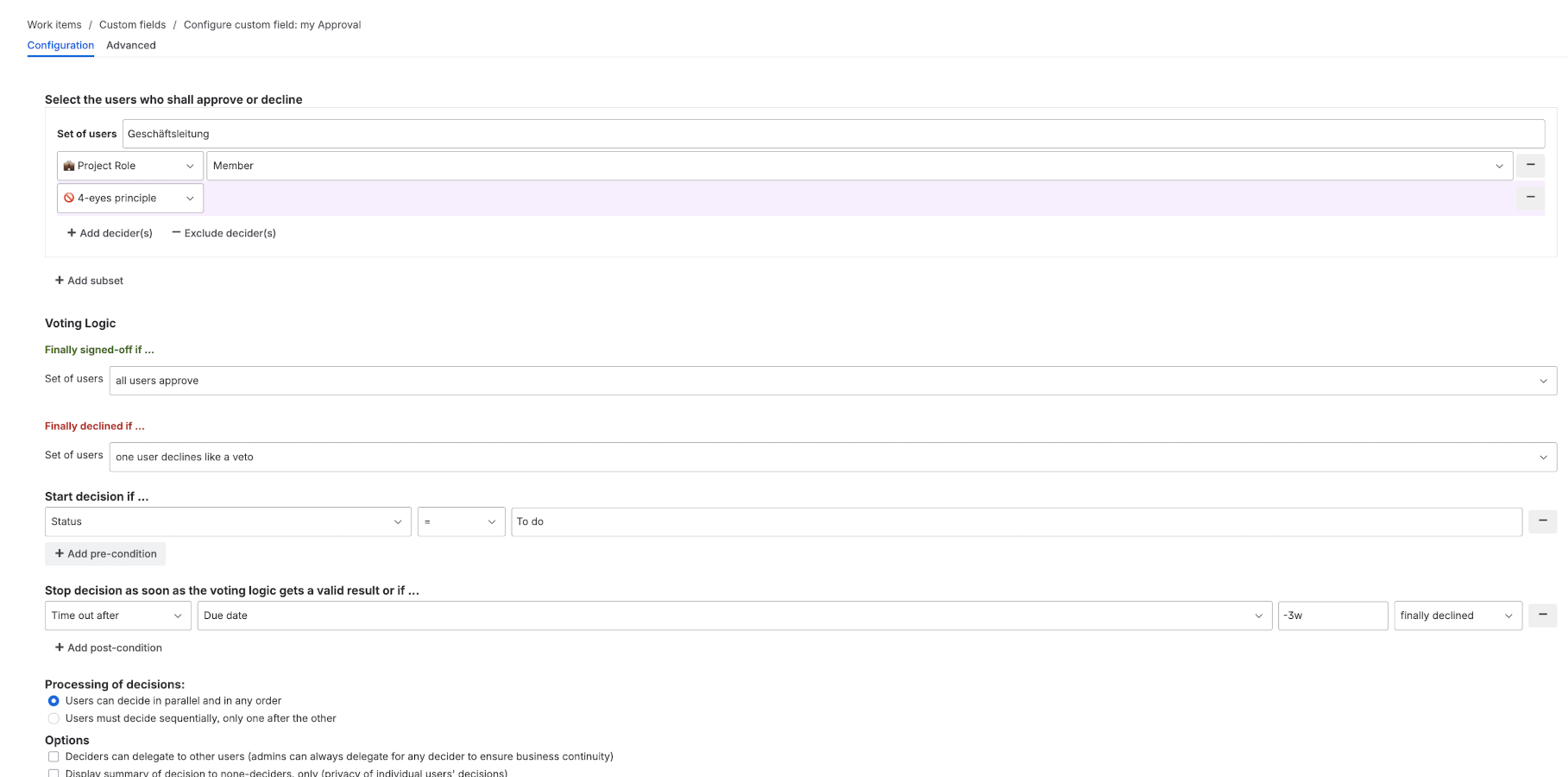
Start by mapping your governance model to approval groups. Each group represents a set of people whose sign-off is required for a specific type of decision. Think about who needs to approve, how many approvals are required from each group, and whether the groups should operate independently or in sequence.
For example, a release approval workflow might include:
- Engineering Review. Requires 2 of 3 senior engineers to approve, ensuring no single engineer can sign off on their own work.
- Security Review. Requires 1 security team member, since the security team is small and any member has the authority to approve.
- Release Approval. Requires both the engineering manager and QA lead, enforcing cross-functional sign-off.
Group Sign-Off lets you set minimum approval thresholds per group (e.g., "2 of 3 must approve") and automatically excludes the issue's reporter or assignee from approving if you need to enforce segregation of duties. This is critical for four-eyes compliance: the person who created the work should never be the same person who approves it.
Step 2: Configure Workflow Transitions
Once your groups are defined, attach them to Jira workflow transitions. Open your Jira workflow in the workflow editor and identify the transitions where formal approval is required. Common examples: "In Review" to "Approved", "Ready for Release" to "Released", or "Change Requested" to "Deployed".
Add the Group Sign-Off post function or condition to these transitions. When an issue reaches a transition that requires approval, the transition is physically blocked until all required sign-offs are complete. No one can bypass it, regardless of their Jira permissions. This is what distinguishes tool-enforced approvals from process-based guidelines: the system prevents non-compliant transitions rather than relying on people to follow the rules.
You can configure different approval groups for different transitions. A minor bug fix might require only engineering review, while a production deployment requires engineering, security, and management sign-off.
Step 3: Set Up Notifications and Reminders
Approval workflows stall when approvers do not know their input is needed. Configure email notifications so approvers are automatically alerted the moment their sign-off is required. Group Sign-Off sends targeted notifications to each approval group, so people only receive alerts for the groups they belong to.
Set up reminder intervals for pending approvals: a reminder after 24 hours and an escalation after 48 hours. This prevents issues from sitting in an approval queue unnoticed. You can also configure delegation rules so that if an approver is unavailable (vacation, sick leave), their approval authority automatically transfers to a designated backup. This keeps the process moving without compromising the approval requirement.
Consider using RAG status indicators on dashboards to flag stalled approvals visually. A red indicator for approvals pending more than 48 hours makes bottlenecks immediately visible to project managers.
Step 4: Monitor, Report, and Audit
Every approval, rejection, delegation, and escalation is automatically recorded with a timestamp, the acting user, and any comments they provided. This audit trail is stored directly in Jira and can be exported for compliance reporting, audit preparation, or regulatory submissions.
Use the approval data to identify bottlenecks in your process. If one approval group consistently takes three days while others respond within hours, that is a signal to review group membership or add backup approvers. Track metrics like average approval cycle time, rejection rate, and delegation frequency to continuously improve your workflow.
When auditors ask for evidence of your approval process, you can export a complete, timestamped record of every decision rather than manually assembling evidence from email threads and Jira comments.
Parallel vs. Sequential Approvals
Choosing between parallel and sequential approvals directly affects your cycle time.
Sequential approvals require groups to approve in a fixed order: Engineering first, then Security, then Management. Each group waits for the previous group to finish before they can begin their review. This approach makes sense when later approvals genuinely depend on earlier ones (e.g., a security review that should only happen after engineering confirms the implementation is complete).
Parallel approvals allow all groups to review and sign off simultaneously. As soon as an issue enters the approval stage, every approval group is notified and can begin their review immediately.
Consider a release approval that requires sign-off from Engineering, Security, and Management:
- Sequential: Engineering takes 1 day, Security takes 1 day, Management takes 1 day. With scheduling gaps and timezone differences, the realistic cycle is 3-5 business days.
- Parallel: All three groups review simultaneously. The cycle time equals the slowest single group, often just hours rather than days.
Real-World Impact: Automotive OEM Case Study
A global automotive OEM with 12 engineering teams across three continents implemented parallel approvals with Group Sign-Off. Their safety-critical software changes required sign-off from engineering, safety, and management teams. With sequential approvals across time zones, the average cycle was 5 business days.
After switching to parallel approvals, their average approval cycle dropped to 1.2 days, a 76% reduction. Their quarterly compliance findings related to approval documentation went from 12 to zero. Audit preparation time dropped from two weeks to two hours.
Their setup included three parallel approval groups attached to a single workflow transition.
For most teams, parallel approvals are the right default. Reserve sequential approvals for cases where there is a genuine dependency between approval stages.
Native Jira vs. Group Sign-Off: Feature Comparison
| Capability | Native Jira Workflows | Group Sign-Off |
|---|---|---|
| Multi-person approval | Not supported | Configurable per group and transition |
| Parallel sign-off | Not supported | Built-in, all groups review at once |
| Audit trail | Basic transition history | Full timestamped approval records |
| Delegation | Not supported | Automatic and manual delegation |
| Rejection workflows | No structured path | Reject with required comments |
| Compliance documentation | Manual assembly from logs | One-click export for audits |
| Segregation of duties | Manual enforcement only | Automatic author/approver exclusion |
| Approval thresholds | Not supported | "N of M must approve" per group |
| Notifications & reminders | Basic Jira notifications | Targeted per-group with escalation |
Best Practices for Approval Workflows
-
Match approval groups to your org chart, not your Jira project structure. Approval authority comes from organizational roles (engineering lead, safety officer, release manager), not from which Jira project an issue belongs to. Define groups based on who has the authority and expertise to approve, and reuse those groups across projects.
-
Set approval thresholds thoughtfully. "2 of 3 must approve" is more resilient than "all 3 must approve" because it prevents a single unavailable person from blocking the entire process. But for safety-critical decisions where you genuinely need every perspective, require full consensus.
-
Default to parallel approvals and justify any sequential steps. Every sequential dependency you add multiplies your cycle time. If Security does not actually need to wait for Engineering's approval before starting their review, run them in parallel.
-
Configure delegation before you need it. Do not wait for someone to go on vacation and block a critical release. Set up delegation rules for every approval group so that backup approvers are ready from day one.
-
Use rejection comments to drive quality. Require approvers to provide a reason when they reject. This creates a feedback loop that helps authors submit higher-quality work and gives you data on common rejection reasons to address at a process level.
-
Review approval metrics monthly, not just for audits. Track average cycle time, rejection rate, and which groups are bottlenecks. A monthly review of these metrics helps you identify process improvements before they become compliance issues.
Key Takeaways
- Native Jira workflows lack the multi-person approval, parallel sign-off, and audit trail capabilities that regulated industries require.
- Parallel approvals are the single biggest lever for reducing cycle time. Teams routinely see 60-80% reductions compared to sequential approaches.
- Every approval, rejection, and delegation should be automatically recorded with timestamps for audit readiness.
- Approval groups should map to organizational authority, with configurable thresholds (e.g., "2 of 3") to balance rigor with resilience.
- Delegation rules should be configured proactively, not reactively when someone is unavailable.
Getting Started
Group Sign-Off works with your existing Jira workflows. Add approval groups, attach them to transitions, and your team can start using formal approvals the same day.
Start a free trial on the Atlassian Marketplace to see how parallel multi-person approvals work in your Jira environment. It is available for Jira Cloud, Data Center, and Server.
For more on compliance workflows, read our guide to the four-eyes principle in Jira.